AI traffic lights in the Learn environment
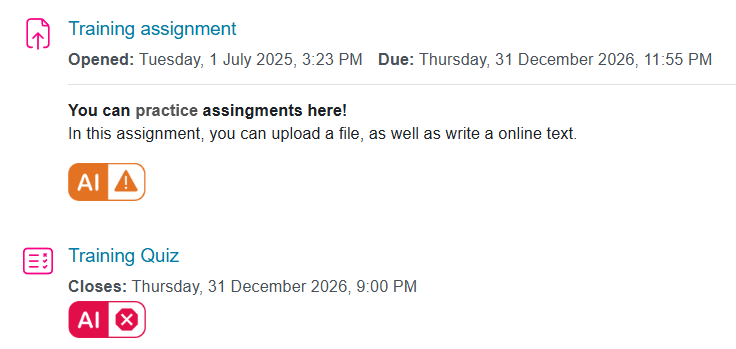 With the help of AI traffic lights, the teacher can define instructions for use of artificial intelligence in the context of course materials and activities. The AI traffic lights are based on Arene's recommendations on the use of artificial intelligence in learning tasks.
The traffic lights are shown as an icon and a tooltip to guide the use of artificial intelligence for the student. Clicking on the AI icon opens more detailed text instructions.
The available options are:
 Required, must be used, must be reported
Artificial intelligence must be used to create outputs*. The student must report how he/she has used AI. Failure to use AI will affect the assessment.
 Prohibited, not to be used
The output* must be created without the help of artificial intelligence.
The use of AI will be interpreted as fraud.
 Allowed, can be used, must be reported
Artificial intelligence can be used in the creation of outputs*, but the student must clearly report its use. Failure to disclose the use of AI will be interpreted as fraud. The use of AI may affect the assessment.
 Allowed, can be used, need not be reported
Artificial intelligence can be used freely and without report to create the output*. The use of AI does not affect the assessment.
*) Output means the final work or competence produced by a student that meets the objectives of the given learning task. This may be an essay, research report, presentation, project, picture, video or mathematical calculation or other concrete work that demonstrates the student's understanding and application of the subject matter.
If an assignment or exam in a course has been marked with "Required, must be used, must be reported" or "Allowed, can be used, must be reported" AI traffic light, please do so in accordance with the Use of AI in academic writing instructions.
How to setup AI traffic lights
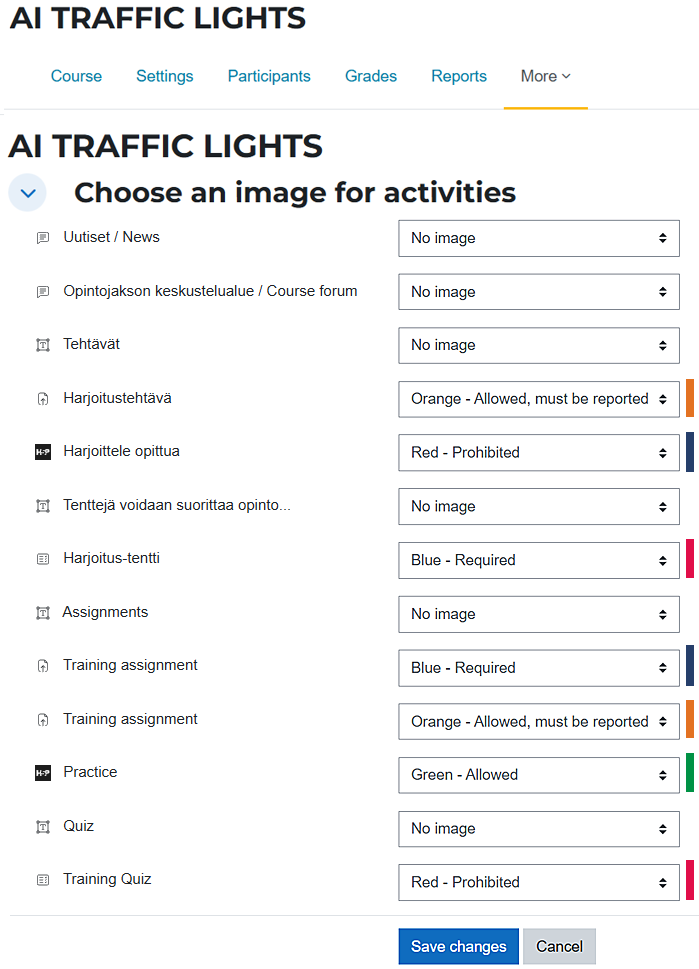
Teachers can choose which AI instructions to use and which course content to apply them to. You can add AI instructions to any course activity or resource, including files, links and instructional texts.
The AI traffic lights can be controlled via the 'AI traffic lights' option in the 'More' menu on the course.
- In the AI TRAFFIC LIGHTS view, you can select the materials and activities to which you want to add AI guidance.
- Select the option you want from the drop-down menu for each content item, then save the changes at the bottom of the page.
- Once the changes have been saved, the AI traffic lights will appear next to the selected content in the course.
The instructions are not automatically included in the course content and do not automatically follow if the course platform or its content is copied.